Windows Desktop Software GPU Accelerated 4K/8K Support

Professional Video Converter for Windows

Convert videos between 300+ formats with lightning speed. Complete privacy, 100% offline processing, and professional-grade quality. Experience 5x faster conversion with GPU acceleration.

300+

Supported Formats

5x

Faster with GPU

0

Cloud Uploads

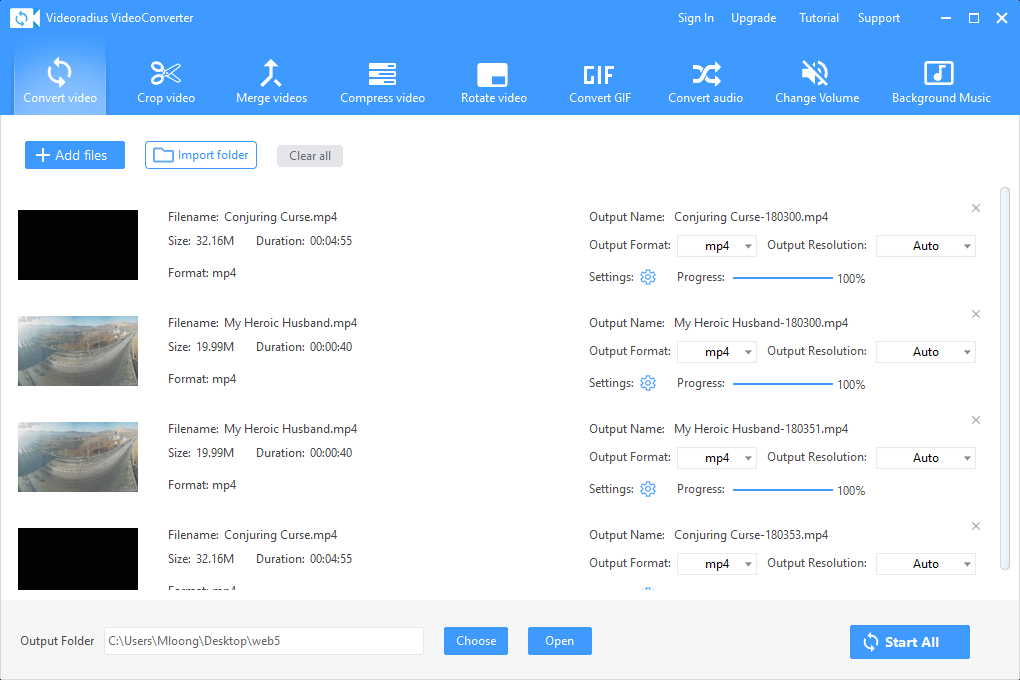
Videoradius Video Converter Interface - Professional video conversion software showing conversion progress and settings

Support for All Popular Video Formats

Convert between MP4, AVI, MOV, MKV, WMV, FLV, WebM, and 300+ other video and audio formats with perfect quality.

MP4 Format

Universal format compatible with all devices and platforms

MOV/AVI

Professional editing formats for video production

MKV/WMV

High-quality video containers with multiple audio tracks

Audio Formats

MP3, AAC, WAV, FLAC, and 50+ audio formats

Plus 300+ more formats including: 3GP, FLV, WebM, VOB, M4V, TS, MTS, M2TS, RM, RMVB, OGV, and more.

Complete Video Conversion Suite

Professional tools for all your video conversion needs with advanced features and optimization

Convert Any Format

Convert between 300+ video and audio formats with one click. Support for 4K/8K, HDR, and all popular codecs including H.264, H.265, VP9, and AV1.

  • MP4, AVI, MOV, MKV, WMV formats
  • FLV, WebM, 3GP, VOB compatibility
  • Preserve original quality and metadata

Batch Processing

Convert hundreds of videos simultaneously. Save time with preset profiles and automated workflows for efficient video processing.

  • Convert entire folders at once
  • Apply same settings to multiple files
  • Save and reuse custom presets

Edit & Crop Videos

Built-in video editing tools. Crop, rotate, adjust volume, add subtitles, and combine videos before converting.

  • Crop specific areas precisely
  • Rotate & flip videos easily
  • Adjust volume and audio sync

Technical Excellence & Performance

Built with advanced technology to deliver professional results with maximum speed and quality.

GPU Acceleration

Leverage NVIDIA CUDA, AMD, and Intel GPU acceleration for up to 5x faster conversion speeds compared to CPU-only processing.

Your Files Never Leave Your PC

Your videos never leave your computer. No internet connection required, ensuring complete privacy and security.

4K/8K & HDR Support

Convert high-resolution videos up to 8K with HDR10/HLG support. Preserve quality throughout the conversion process.

Why Choose Videoradius?

Compare our professional software with free online converters.

Feature Videoradius Free Online Converters
Format Support 300+ formats Limited formats
Processing Speed GPU accelerated Slow, CPU only
Batch Processing Yes No
Privacy Protection 100% offline Uploads to cloud
File Size Limit No limit Limited (usually 100MB)

Choose Your Perfect Plan

Start with our fully-featured free version. Upgrade to Premium for unlimited capabilities.

Free Version

Perfect for occasional video conversion needs

  • Convert single videos
  • Popular formats (MP4, AVI, MOV)
  • Basic editing tools
  • 100% offline processing
  • No watermarks
  • Email support
Free Download
MOST POPULAR

Premium Version

For professionals, content creators, and power users

  • Everything in Free version
  • Batch processing for multiple files
  • 300+ formats & 4K/8K support
  • GPU acceleration for 5x speed
  • Advanced editing tools
  • Priority email support
Buy Now —Go Premium

One-time purchase · Lifetime license · No subscription

Frequently Asked Questions

Find answers to common questions about Videoradius Video Converter

Videoradius Video Converter supports 300+ video and audio formats, including MP4, AVI, MOV, MKV, WMV, FLV, WebM, 3GP, VOB, M4V, TS, MTS, M2TS, RM, RMVB, and many more. Both input and output support all major codecs such as H.264, H.265/HEVC, VP9, and AV1.

Videoradius leverages NVIDIA CUDA, AMD, and Intel GPU hardware encoding to accelerate conversion by up to 5x compared to CPU-only processing. GPU acceleration is automatically detected and enabled when supported hardware is available, requiring no manual configuration.

Yes. Videoradius Video Converter is 100% offline software. All video processing happens locally on your computer —no files are ever uploaded to any server. This ensures complete privacy, no file size limits, and consistent performance regardless of your internet connection.

Batch processing allows you to convert hundreds of video files at the same time with the same settings. Instead of converting files one by one, you simply add an entire folder, set your output format and quality, and let the software handle the rest. This feature is available in the Premium version.

No. Videoradius Video Converter does not add watermarks in either the free or premium version. The free version includes basic conversion capabilities with popular formats, while Premium unlocks batch processing, all 300+ formats, GPU acceleration, and advanced editing tools.

The built-in editor lets you crop video to any aspect ratio, rotate and flip footage, adjust volume and audio sync, add external subtitle files (.SRT, .ASS), trim clips to specific start/end times, and merge multiple clips into one file —all before or during conversion without quality loss.

Videoradius Video Converter requires Windows 10 or Windows 11 (64-bit), a minimum of 4GB RAM (8GB recommended for 4K/8K conversion), 500MB of free disk space for installation, and a graphics card supporting DirectX 11 or later. GPU acceleration requires a compatible NVIDIA, AMD, or Intel GPU.

Still have questions? Try it free or go premium today.

Ready to Convert Your Videos?

Download Videoradius Video Converter today and experience professional-grade video conversion on your Windows PC.

Download Now

Get started with our free version today. No registration required—just download and start converting.

100% Safe & Offline

No cloud uploads, complete privacy protection

Fast Installation

Under 1 minute to download and install

Free Support

Email support for all users

Windows 10/11 (64-bit)

Compatible with latest Windows versions

Free Download Buy Premium

One-time purchase · Lifetime license

File size: 30 MB • Version 1.6.3 • Updated: Feb 2026