Shrink Video Size by Over 90% on Your PC
Professional video compression software for Windows that reduces file sizes by over 90% while preserving visual quality. Perfect for email, social media, and saving storage space. All processing happens locally on your computer.
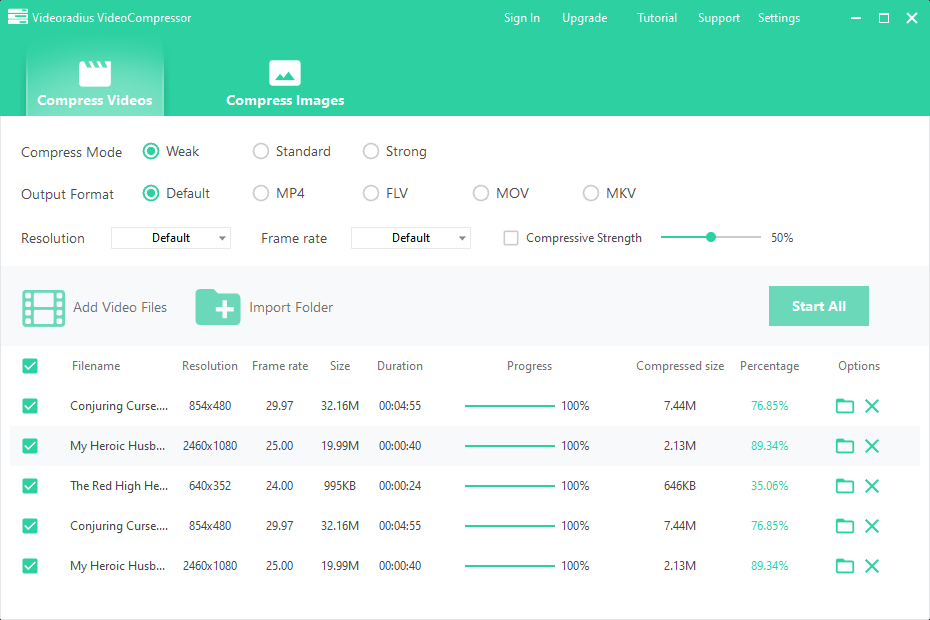
What Makes It Different
Advanced compression technology designed for content creators, businesses, and everyday users.
Smart Compression
Intelligent algorithms analyze your videos to find the optimal balance between size reduction and quality preservation. No technical knowledge required.
Batch Processing
Process hundreds of videos or images simultaneously. Perfect for compressing entire project folders, photo libraries, or video collections.
- Compress multiple formats at once
- Maintain folder structure
Your Files Stay Private
Your files never leave your computer. No uploads, no cloud storage, complete privacy. Perfect for confidential business videos and personal media.
4K & HD Support
Compress high-resolution videos without noticeable quality loss. Supports 4K, 2K, 1080p, and all standard resolutions. Preserve details for professional work.
Advanced Controls
Fine-tune compression settings for perfect results. Adjust bitrate, resolution, framerate, and more. Presets for different use cases included.
- Custom compression levels
- Target file size option
Format Versatility
Support for all popular video and image formats. Convert while compressing or maintain original format. Batch conversion available.
Solve Your "File Too Large" Problems
Videoradius Compressor is designed for the real-world challenges you face every day.
Email Attachments
Compress videos to fit within email size limits, ensuring they reach your clients and colleagues without compromising quality.
Social Media & Cloud
Meet strict upload limits on Instagram, YouTube, WhatsApp, or Google Drive without sacrificing visual quality.
Free Up Disk Space
Reclaim gigabytes of valuable storage on your PC by compressing old project files, media libraries, and backups.
Web Optimization
Optimize videos for websites, blogs, or online courses to ensure fast loading and smooth playback on all devices.
Reduce Video Size in 3 Simple Steps
Easy to use, even for beginners. Get started in minutes.
Add Your Video
Drag and drop your video files or select them from your computer. Supports all popular video formats including MP4, MOV, MKV, AVI, and more.
Choose Settings
Select your preferred compression level or customize advanced settings. Preview the result before finalizing. Live preview shows quality changes instantly.
Compress & Save
Click the compress button and save your smaller video file. Keep the original or replace it with the compressed version. Batch processing available for multiple files.
Frequently Asked Questions
Common questions about our video compression software.
Still have questions? Visit our help center.
Supported Video & Image Formats
Compress all popular video and image formats.
MP4
Most Common Format
MOV
Apple Video Format
AVI
Windows Video Format
MKV
High Quality Video
Plus many more formats. Pro version supports batch compression of all formats.
Unlock All FormatsReady to Start Compressing?
Try the free trial or upgrade to Pro for unlimited compression power.
One-time purchase · Lifetime license · No subscription
Windows 10/11
64-bit version
100% Safe
No ads, no spyware
Quick Install
Under 2 minutes
File size: 50 MB —Version 1.6.4 —Updated: March 2026