Crystal Clear 4K Screen Recording with Studio-Grade Audio
Record your screen in stunning 4K quality with AI-powered audio enhancement. Capture tutorials, gameplay, presentations, and more with crystal-clear audio and professional results.
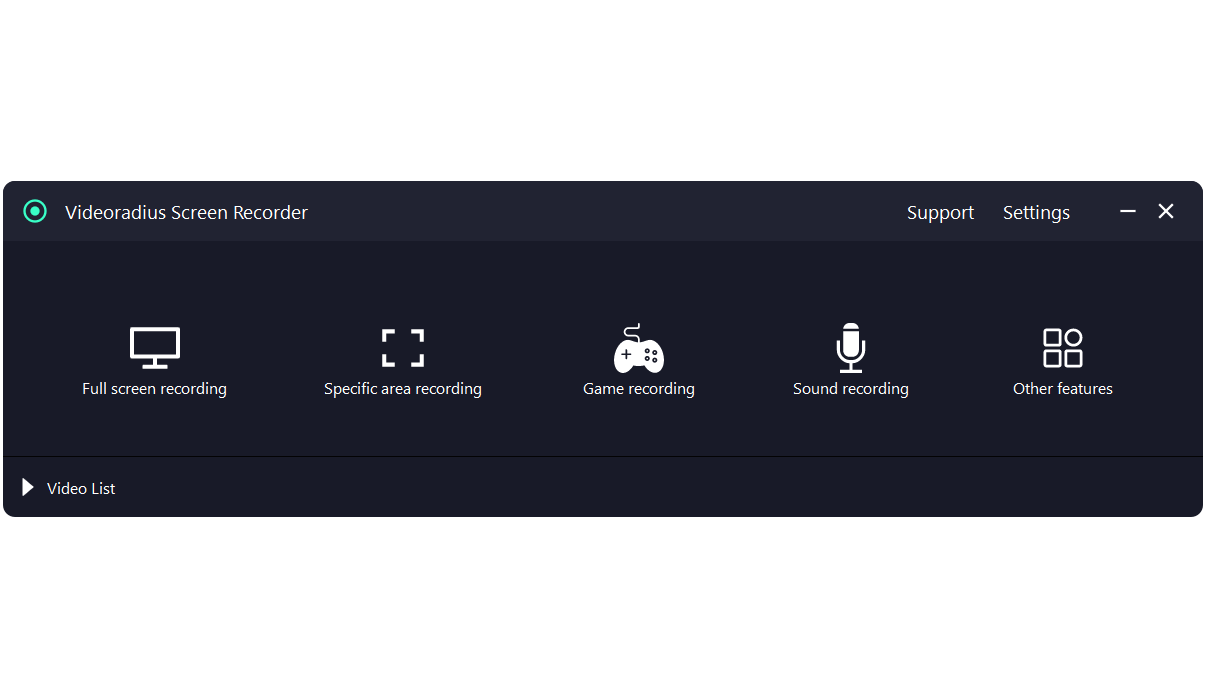
Core Features & Capabilities
Powerful tools designed for content creators, educators, and professionals who demand quality and reliability.
4K Screen Recording
Capture your entire desktop or specific areas in stunning 4K resolution at 60 FPS. Perfect for high-quality tutorials, presentations, and software demonstrations.
- Full screen recording
- Custom area selection
- 60 FPS smooth capture
- Adjustable quality settings
AI Audio Enhancement
Professional audio processing with real-time noise cancellation and vocal enhancement. Record studio-quality audio from any environment.
- Background noise removal
- Voice clarity enhancement
- System audio capture
- Microphone & system audio mixing
Game Recording
Optimized for gaming with minimal performance impact. Record gameplay at high frame rates while maintaining smooth gameplay.
- Low CPU usage mode
- Hardware acceleration
- Performance monitoring
- Webcam overlay support
Camera Overlay
Add your webcam feed to recordings. Perfect for tutorials, game streaming, and personal presentations.
- Picture-in-picture mode
- Adjustable size & position
- Green screen support
- Camera effects & filters
Mouse Effects
Enhance your recordings with visual mouse effects. Highlight clicks, add pointer trails, and customize cursor appearance.
- Click visualization
- Mouse highlight effects
- Custom cursor colors
- Pointer trails & spots
Advanced Settings
Full control over your recording settings with professional-grade customization options.
- Custom hotkeys
- Schedule recording
- Multiple output formats
- Watermark-free export
Perfect for All Your Recording Needs
From professional tutorials to gaming highlights, our screen recorder adapts to your specific requirements.
Tutorials & Courses
Create professional software tutorials, online courses, and training videos with clear audio and mouse highlighting.
Game Streaming
Record gameplay at high frame rates with low CPU usage. Add webcam overlay and commentary for engaging content.
Business Presentations
Record meetings, webinars, and software demos with professional quality. Perfect for remote teams and client presentations.
Support & Demos
Create software demos, bug reports, and customer support videos. Annotate and highlight important areas for clarity.
Technical Excellence & Performance
Our screen recorder is built with advanced technology to deliver the best recording experience for both casual users and professionals.
Low Resource Usage
Optimized to use minimal CPU and memory, so you can record while working or gaming without slowdowns.
Your Recordings Never Leave Your PC
All recording and processing happens locally on your computer. No internet connection required, ensuring complete privacy.
4K & High FPS Support
Record in up to 4K resolution at 60 FPS for smooth, professional-quality videos suitable for any platform.
Why Choose Our Screen Recorder?
Vs. Browser-Based Recorders
Browser-based recorders upload your videos to their servers, limit recording time, add watermarks, and compromise your privacy. Our software processes everything locally with no upload required.
Vs. Basic Screen Capture Tools
Basic capture tools lack AI audio enhancement, game recording mode, and 4K support. Our recorder delivers professional-grade output without limitations.
| Feature | Our Software | Free Alternatives |
|---|---|---|
| 4K Recording | ||
| AI Audio Processing | ||
| Privacy Protection | ||
| Watermark-Free |
Free vs. Premium Comparison
Start with our free trial. Upgrade to Premium for advanced capabilities and professional workflows.
| Feature | Free Version | Premium Version |
|---|---|---|
| Basic Screen Recording Full screen & area recording |
||
| Audio Recording Microphone & system audio |
||
| AI Audio Enhancement Noise removal & vocal enhancement |
||
| 4K Recording Ultra HD video quality |
1080p only | |
| Game Recording Mode Optimized for gaming |
||
| Camera Overlay Webcam picture-in-picture |
||
| No Watermarks Clean output videos |
||
| Priority Support 24-hour response time |
Free Version
Perfect for basic screen recording needs. No registration required.
- Full screen & area recording
- Microphone & system audio
- 1080p resolution
- Basic editing tools
- Community support
Premium Version
RECOMMENDEDFor professionals, streamers, educators, and content creators who need advanced features.
- Everything in Free version
- AI noise removal & vocal enhancement
- 4K recording at 60 FPS
- Game recording optimization
- No watermarks, priority support
One-time purchase · Lifetime license · No subscription
Frequently Asked Questions
Find quick answers to the most common questions about Videoradius Screen Recorder.
Have more questions? Visit our help center.
Start Recording Today
Download Videoradius Screen Recorder and capture everything on your screen with professional quality.
Windows 10/11
64-bit version
100% Safe
No ads, no spyware
Free Trial
All features included
Buy Premium —Unlock All Features
File size: 64 MB —Version 1.3.3 —Updated: March 2026