Professional Audio Editing Made Simple
Transform your audio workflow with our all-in-one Windows audio editor. Cut, trim, merge, convert, and enhance MP3, WAV, M4A files with studio-quality precision—all processed locally on your computer for complete privacy.
Audio Formats
Cloud Uploads
Features
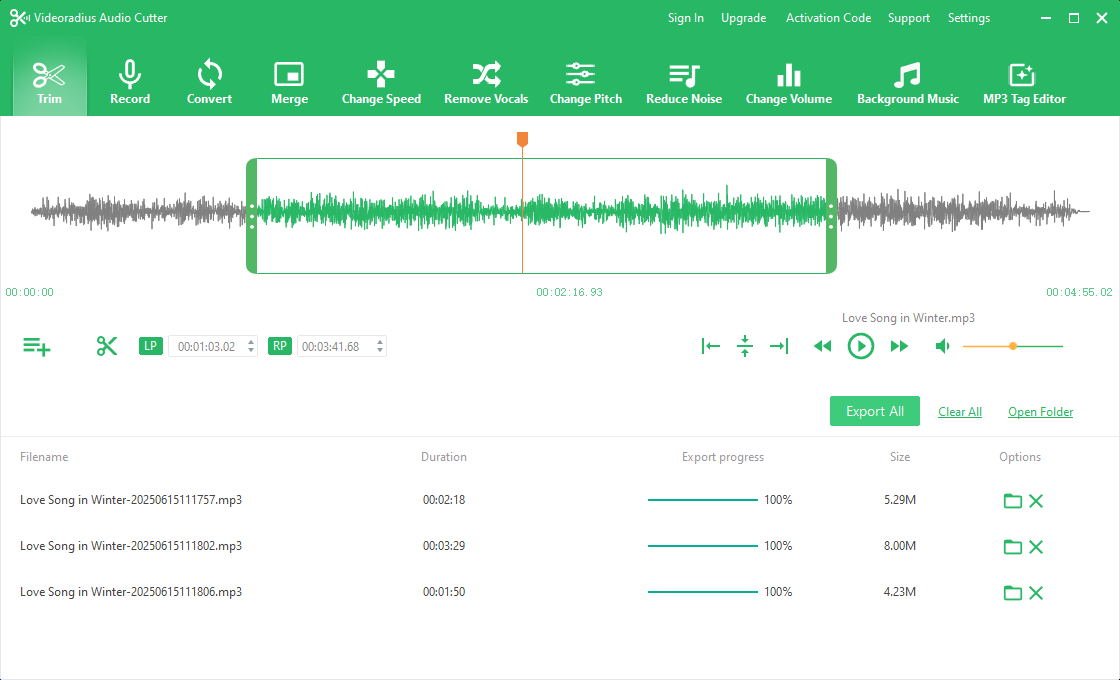
Core Features & Capabilities
Designed for podcasters, musicians, video creators, and audio professionals who demand precision and quality in their workflow.
Precision Audio Cutting
Edit audio with sample-level accuracy using our intuitive waveform editor. Set precise LP/RP markers, split at exact points, and trim unwanted sections with visual feedback.
- Visual waveform editing with zoom
- Set precise start/end markers
- Fade in/out with customizable curves
- Multi-track selection and editing
Convert & Merge Files
Convert between 20+ audio formats (MP3, WAV, FLAC, AAC, M4A, OGG, WMA) without quality loss. Merge multiple files into one seamless track.
- Support for all popular audio formats
- Preserve metadata and ID3 tags
- Adjust bitrate (32-320 kbps)
- Batch conversion for multiple files
Advanced Audio Effects
Transform your audio with professional effects. Use AI-powered vocal removal for karaoke, change speed without pitch distortion, adjust pitch for creative effects.
- AI-powered vocal removal (create instrumental tracks)
- Speed adjustment (-50% to +300%)
- Pitch shifting (+12 to -12 semitones)
- Background music mixing with volume control
Your Audio Toolkit —All in One App
Everything you need for professional audio editing in one powerful application
Trim & Cut
Precision audio editing tools
Record Audio
Direct recording feature
Convert Formats
20+ audio formats
Merge Files
Combine multiple tracks
Change Speed
Adjust playback speed
AI Vocal Removal
Create karaoke tracks
Change Pitch
Semitone adjustments
Reduce Noise
Clean audio quality
Adjust Volume
Level normalization
Add Background Music
Audio mixing
MP3 Tag Editor
Metadata management
Batch Processing
Process multiple files
Perfect For Your Audio Projects
Whether you're a podcaster, musician, video creator, or audio enthusiast, our software adapts to your specific needs.
Podcast Production
Clean interview recordings, remove background noise, add intro/outro music, adjust levels, and export in podcast-ready formats.
Music Creation
Create backing tracks, extract instrumentals, change song keys, adjust tempo for practice, or prepare demos for distribution.
Video Production
Sync audio with video, clean dialogue recordings, add sound effects, create voiceovers, and optimize audio for YouTube/Vimeo.
Education & Business
Create online course audio, clean lecture recordings, prepare audio for presentations, or convert meeting recordings.
How to Edit Audio in 3 Steps
Import & Visualize
Drag and drop your audio file (MP3, WAV, M4A, FLAC, AAC, etc.) to instantly visualize the waveform. Our software supports over 20 audio formats for input.
Edit & Enhance
Use visual LP/RP markers to trim precisely. Apply effects: remove noise, adjust volume, change speed/pitch, extract vocals with AI, or add background music.
Export & Share
Choose output format and quality settings. Export individual files or use batch processing for multiple files. Your files stay on your computer—no cloud uploads.
Why Choose Our Audio Editor?
Discover the benefits of using professional audio editing software designed for Windows users who value quality, privacy, and efficiency.
Your Files Stay on Your Device
Your audio files never leave your computer. Unlike web-based editors that upload recordings to remote servers, Videoradius processes everything locally—ensuring privacy, faster turnaround, and no upload size limits.
- No internet connection required
- No file size restrictions
- Complete data privacy
Fast & Efficient Workflow
Optimized for modern Windows PCs with hardware acceleration. Process large audio files in seconds, not minutes. Batch processing allows you to edit multiple files simultaneously, saving hours of manual work.
- Hardware acceleration support
- Batch process multiple files
- Preset templates for quick editing
Wide Format Support
Work with any audio format: MP3, WAV, M4A, FLAC, AAC, OGG, WMA, and more. Convert between formats without quality loss. Perfect for compatibility with all devices and platforms.
- 20+ input/output formats
- Lossless conversion options
- Bitrate control (32-320 kbps)
Professional Audio Tools
From basic trimming to advanced AI-powered vocal removal, our software includes all the tools audio professionals need. Perfect for podcasters, musicians, video editors, and audio engineers.
- Studio-quality effects
- Visual waveform editing
- Professional metadata editor
- AI-powered vocal extraction
Built for Windows 10 & 11
Videoradius Audio Cutter is a native 64-bit Windows application optimized for modern hardware. It handles everything from quick MP3 trims and multi-format conversions to AI-powered vocal extraction—without requiring an internet connection or a cloud subscription. Whether you are a podcaster cleaning up interviews or a musician preparing demo tracks, the software scales to your workflow.
Frequently Asked Questions
Find answers to common questions about our audio editing software
Still have questions? Visit our help center.
Ready to Edit Audio Like a Pro?
Download Videoradius Audio Cutter today and experience professional-grade audio editing on your Windows PC.
Download Now
Get started with our free version today. No registration required—just download and start editing.
100% Safe & Secure
No ads, no spyware, no data collection
Fast Installation
Under 2 minutes to download and install
Free Support
Email support for all users
Windows 10/11 Compatible
Optimized for the latest Windows versions. 64-bit architecture for maximum performance.